How to use Attesta
Attesta answers about five questions when you install it, then writes the invoice for every paid order on its own. This guide walks through each screen and explains what the app decides for you.
What Attesta does
Attesta watches your paid Shopify orders. When one is paid it picks the German tax treatment that fits the buyer, takes the next number in your sequence, renders your branded invoice, embeds the machine readable XML inside it, files the result in a ten-year archive and emails it. You do not open the order.
What it produces is a ZUGFeRD 2.2 invoice: a PDF/A-3 a person can read, with the EN 16931 CII XML attached inside the same file. The XML is the part that counts legally, and it is the part a plain PDF has never had. For public-sector buyers with a Leitweg-ID, Attesta emits XRechnung 3.0 instead.
The app is built for Germany. Other EU markets are designed but not active yet, so a shop selling from outside Germany is not covered today.
Getting started
Installing from the App Store opens a short wizard. It runs once and asks about five questions, then the app is working.
- Company and tax. Your legal name and address, USt-IdNr. and Steuernummer, and whether you invoice as a Kleinunternehmer under §19 UStG. These print on every invoice, so give the registered details rather than the trading name.
- Invoice rules. Whether invoices issue automatically when an order is paid or wait for you, how numbering runs, and whether to collect EU VAT IDs from business buyers. If you already have a number series, tell Attesta the last number you used and it continues from there rather than restarting at 1.
- Finish. Everything else comes from your shop: currency, buyer addresses, line items, tax rates.
The wizard is deliberately short. Attesta asks about five questions because the rest is either in your shop already or fixed by the law.
Your dashboard
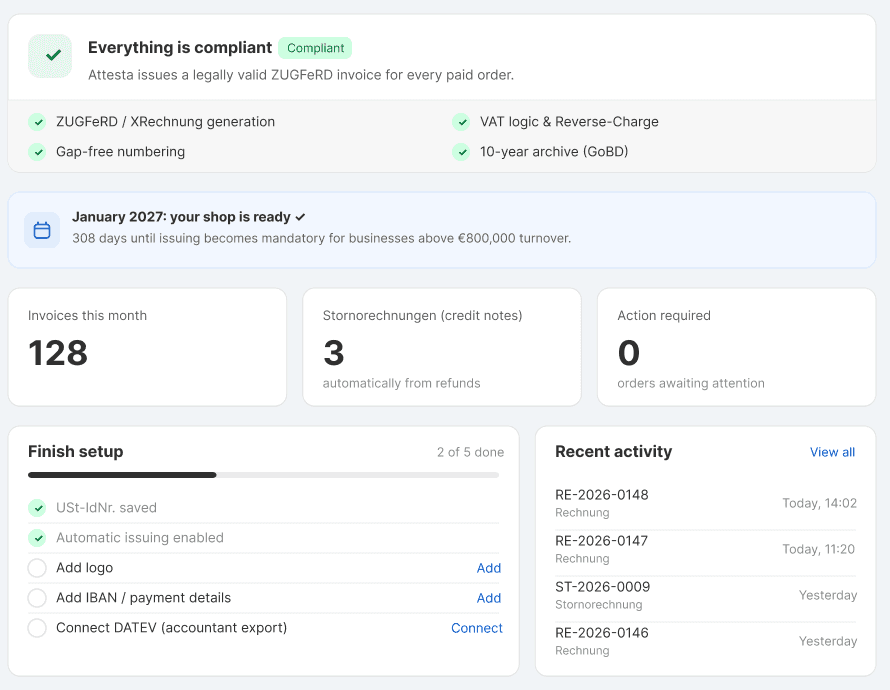
Home answers one question: is this shop compliant right now. The status card at the top says either that everything is compliant or that something needs attention, and lists the four checks behind that answer, which are ZUGFeRD and XRechnung generation, gap-free numbering, VAT logic and Reverse-Charge, and the ten-year GoBD archive.
Below it sits a countdown to January 2027, counters for invoices this month, Stornorechnungen and orders waiting on you, a setup checklist for the things worth finishing (logo, IBAN and payment details, DATEV), and the documents issued most recently. Every number comes from your real data.
On the free plan the page also shows how many invoices you have issued this month against the free allowance.
Your invoices
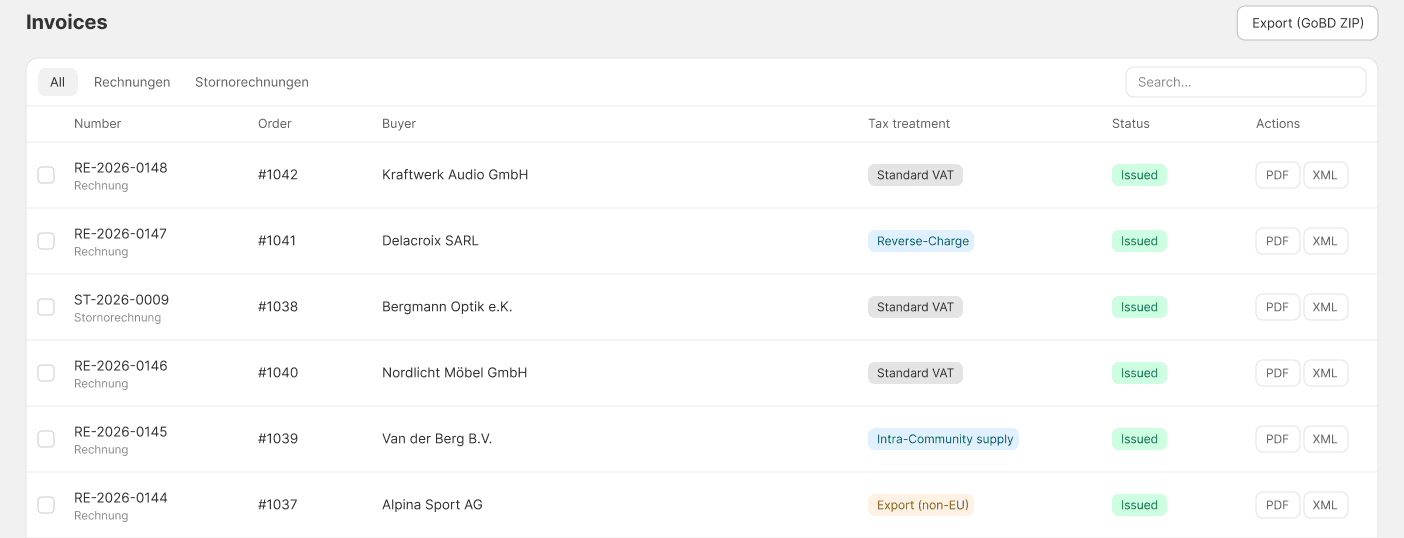
Rechnungen lists every document Attesta has issued, newest first: the number and whether it is a Rechnung or a Stornorechnung, the order behind it, the buyer, the tax treatment that was applied, its status, and the PDF and XML. You can filter by type and search. The list reads from a flat ledger, so it opens at once however many invoices sit behind it, and Export pulls the whole ledger down as a GoBD ZIP.
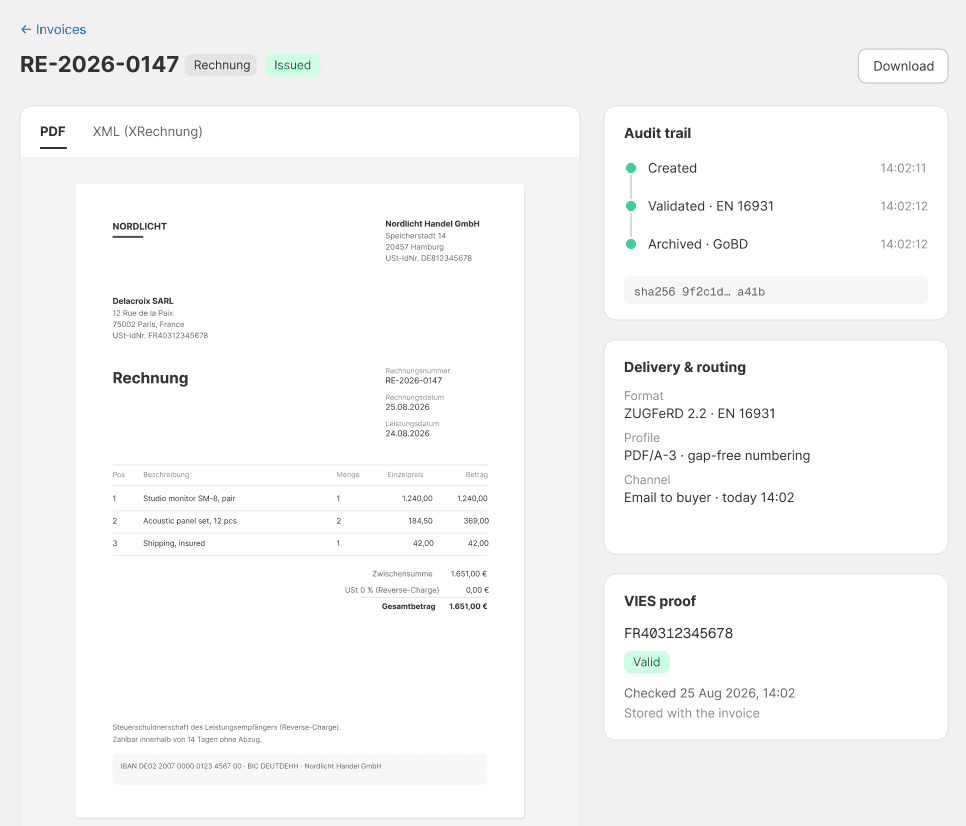
Opening a document shows the legal record in a readable form:
- A preview of the invoice as it was rendered, with the XML on its own tab next to it.
- An audit trail of created, validated and archived, carrying the GoBD hash for that document.
- Delivery and routing, which names the format that went out: ZUGFeRD 2.2, EN 16931, PDF/A-3.
- VIES proof, the stored VAT-ID check, when the buyer gave one.
Download saves the real file, the same bytes that were archived, not a fresh render. There is no Create button on this page, because every document comes from a paid order.
When an order cannot be invoiced, Attesta records the problem rather than failing quietly. The open count shows on Home and the list lives under Probleme, where you can fix the cause and retry the order.
Tax treatment
Attesta decides the treatment per order, from the buyer, not from a setting you have to remember to change:
- Standard German VAT at 19% or 7% on a domestic sale.
- Reverse-Charge (§13b UStG) for a business buyer in another EU country with a valid VAT ID. The invoice goes out at 0% and carries the reverse-charge notice.
- Intra-Community supply at 0%, on goods moving to a VAT-registered business elsewhere in the EU, with the VAT ID as proof.
- Export (§6 UStG), no VAT, for goods leaving the EU.
- Kleinunternehmer (§19 UStG), if you set that in onboarding. No VAT is shown and the §19 notice takes its place.
The treatment chooses both the legal notice printed on the invoice and the tax codes written into the XML, and it is shown on every row of the invoice list so you can see what was applied without opening the document.
VAT IDs and VIES
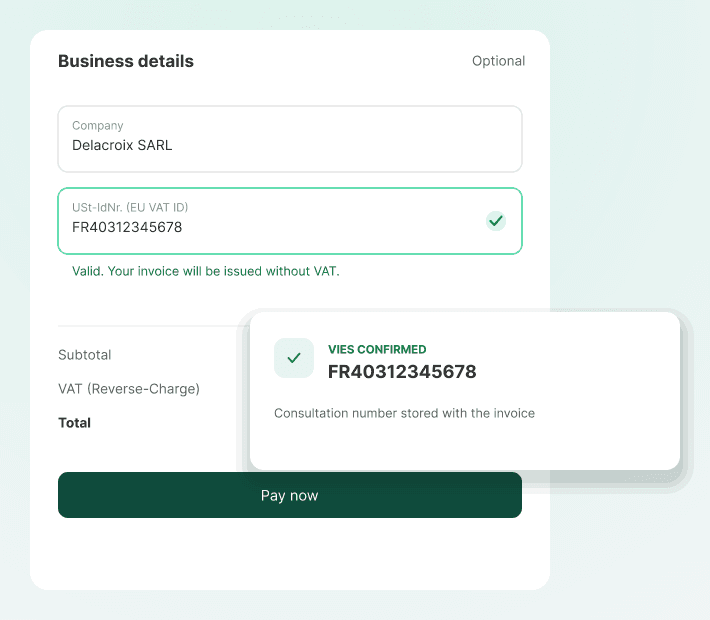
Reverse-Charge only holds up if the buyer's VAT ID is real, so Attesta collects it before the order is paid. There are three places a business buyer can enter it: a block in checkout, a block in the cart, and their customer account profile.
The ID is checked against VIES, the EU commission's VAT number service. Attesta stores the consultation it got back and shows it on the invoice detail page, so if the treatment is ever questioned you have the check on file with the document rather than a claim that you did it.
Refunds and corrections
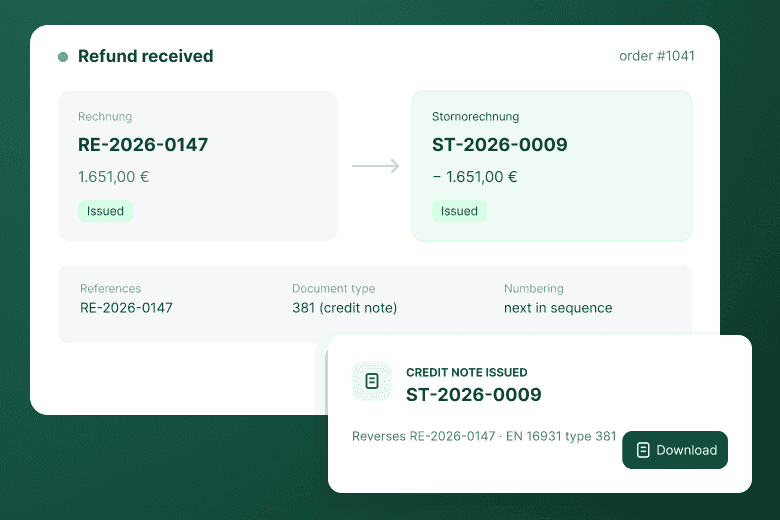
A German invoice is never edited after it is issued. It is reversed by a credit note, a Stornorechnung, and Attesta writes those for you.
- Refund a paid order and Attesta issues an EN 16931 credit note that reverses the refunded amount, references the original invoice and takes the next number in the same sequence.
- Edit a paid order and Attesta compares the edited order against the invoice on file. If the amounts or the VAT changed, it cancels the old invoice in full and issues a corrected one in the same locked step. Both go to the buyer, the cancellation first.
- Edits that change no money, such as tags, notes, fulfilment or a corrected address, produce no new document.
- An order edited down to nothing invoiceable is cancelled without a replacement.
Your invoice design
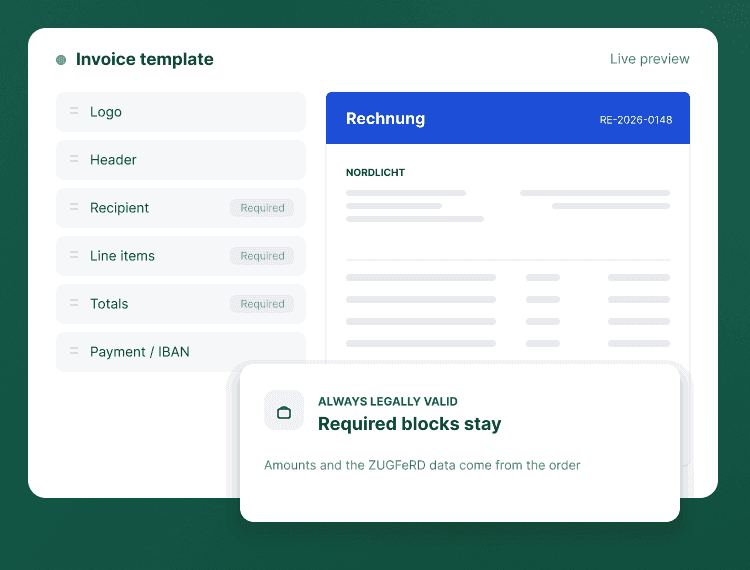
The Rechnungsvorlage screen is where the invoice gets your brand instead of ours. It has three regions.
- On the left, the blocks that make up the invoice. Drag to reorder recipient, line items, totals, payment details, notes and footer. The blocks the law requires are locked, so reordering cannot accidentally cost you the legal validity of the document.
- In the middle, a live preview of your own invoice. A switcher renders it under each tax case, including a credit note, so you can see how a Reverse-Charge or §19 invoice will look before one exists. Clicking a region of the preview selects that block.
- On the right, the Block, Brand and Template tabs: which line-item columns appear, your logo, accent colour and font, and the base layout.
Nothing here can change a number. The design controls presentation only, and every layout in the catalog renders all the mandatory EN 16931 fields.
Settings
Five cards, each opening its own editor.
- Company and tax. Your legal identity, tax IDs and the Kleinunternehmer toggle. The same details the wizard asked for, editable afterwards.
- Invoice rules. Automatic or manual issuing, the numbering series including continuing an existing one, and B2B VAT-ID capture.
- Delivery. The subject and message of the invoice email and its reply-to address, plus your payment block: IBAN, BIC, payment terms and the net term in days, which becomes the due date on the invoice.
- Accounting. Your tax accountant's email, your DATEV Berater and Mandant numbers, and whether the export books against SKR03 or SKR04. Any of the eight accounts it uses can be overridden if your accountant runs a custom chart.
- Advanced. Your default Leitweg-ID for public-sector buyers, whether B2G invoices go out as XRechnung, and your GoBD archive information and data export.
At the bottom is a country section that reflects where you sell. For Germany it says that no transmission network is required, because a German invoice reaches the buyer by email.
Archive and exports
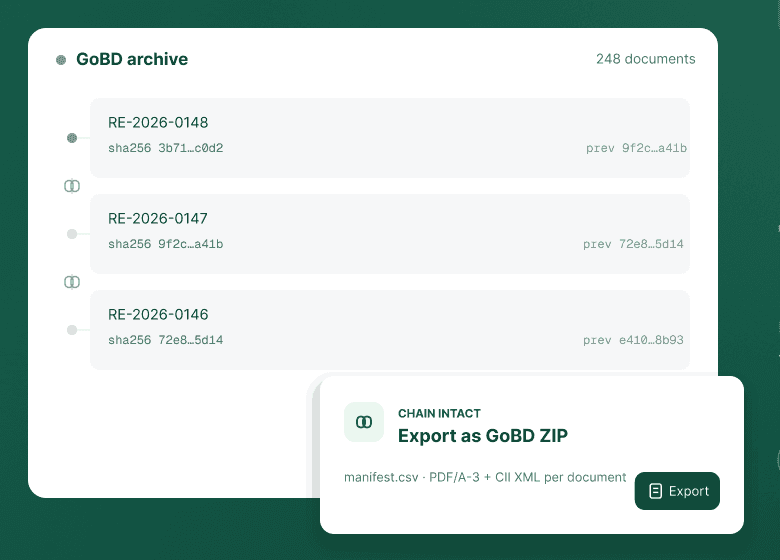
Every document Attesta issues is stored with its XML and a SHA-256 hash that chains to the document before it, along with a snapshot of the template it was rendered with. That is what makes the archive tamper-evident, and what a Betriebsprüfer is looking for when GoBD asks you to keep the record complete for ten years.
Three exports come out of it:
- GoBD ZIP, from the invoice list or the Advanced card. It holds the XML and PDF of every document plus a manifest carrying the hash chain, which is also what you hand over for a GDPR data request.
- Verfahrensdokumentation, the procedural documentation GoBD expects, generated as a German PDF pre-filled with your details and how the pipeline works. A few merchant-only passages are left as visible placeholders for you to complete.
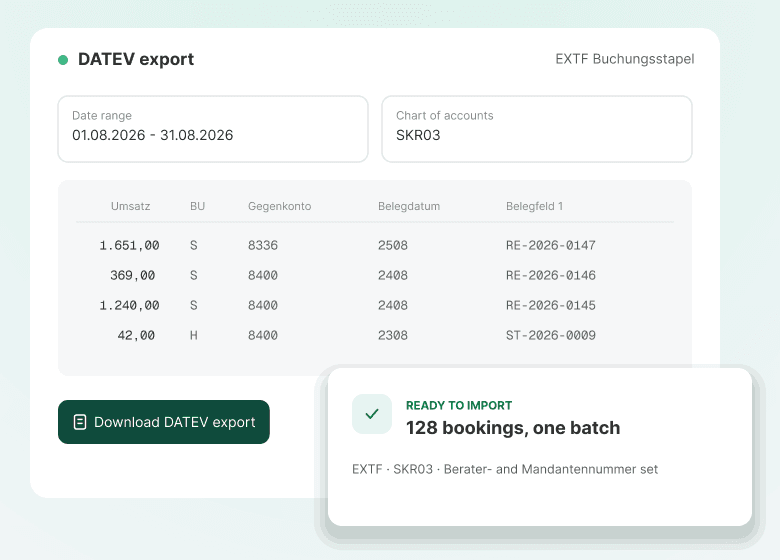
- DATEV Buchungsstapel, an EXTF booking batch for a date range, with one row per VAT-rate group so a mixed-rate invoice splits correctly, mapped to your SKR03 or SKR04 accounts. A range has to sit inside one fiscal year, and your Berater and Mandant numbers have to be filled in, because DATEV refuses the import without them. Rows are not marked as final, so your accountant reviews the batch before posting it.Accounting
The GoBD ZIP is available on every plan, including Free, because getting your own records out is not something to charge for. The DATEV batch needs the Accounting plan.
Plans and billing
Everything the law requires is in every paid plan. Plans differ by volume and by accounting workflow, never by whether your invoices are legally valid.
- Free, $0 - ZUGFeRD and XRechnung, manual or automatic issuing, email delivery and numbering. There is a soft allowance of 25 invoices a month: past it Attesta suggests upgrading, but it keeps issuing. Compliance is never switched off. Invoices on the free plan carry a small "Erstellt mit Attesta" line on the visual, never in the XML, because the XML is the legal record.
- Compliance, $9/month (or $90 a year, taken as one charge) - unlimited invoices, automatic Stornorechnungen, USt-IdNr.-Erfassung with VIES, automatic Reverse-Charge and the GoBD ten-year archive.
- Accounting, $19/month (or $190 a year, taken as one charge) - everything in Compliance plus the DATEV package, numbering migration, Verfahrensdokumentation and CSV export.
Billing runs through Shopify and appears on your normal Shopify invoice, in USD. A year costs ten months, so annual billing saves 16.67%. You can change plans or cancel from inside the app at any time, and if you cancel you land back on Free, where invoicing keeps working: the free tier still issues legally valid e-invoices.
FAQ and troubleshooting
Is a PDF invoice not enough? Not under the German mandate. From January 2027 a B2B invoice has to carry structured data a machine can read. ZUGFeRD solves it by putting that data inside the PDF, so the same file works for your buyer and for their software.
I already have an invoice number series. Will it restart? No. In onboarding, or later under invoice rules, enter the last number you issued and Attesta continues the sequence from there. Numbering stays gap-free across the whole ledger.
My shop is not in Germany. Attesta is Germany-first today. Other markets change the tax-ID fields, the currency, the invoice format and how the invoice is transmitted, and each one has to be built before it is offered. They are on the roadmap, not in the app.
Will it slow my storefront down? No. Attesta works behind Shopify webhooks and touches nothing a shopper loads. An invoice normally appears within a minute of the order being paid.
My buyer never got the invoice email. Check the reply-to address and message under Delivery in Settings, then open the document: if it is archived, the file exists and you can send it yourself with Download while you sort the address out.
What happens to my data if I uninstall? Access is revoked at once and Shopify then asks us to erase the shop's data. Export the GoBD ZIP first: German retention rules are your obligation, and they run for ten years whether or not the app is still installed. See the Privacy Policy.